

Smart inbox

A smart inbox for calendar changes.

Supaplan Smart Inbox is a smart calendar inbox and change feed for people who need to see what changed, what needs attention, and what can be handled next.

Best forPeople whose calendar changes often enough that email notifications become unreliable.

Download on the App Store
Get it on Google Play
In practice

A noisy invite stream becomes an attention queue.

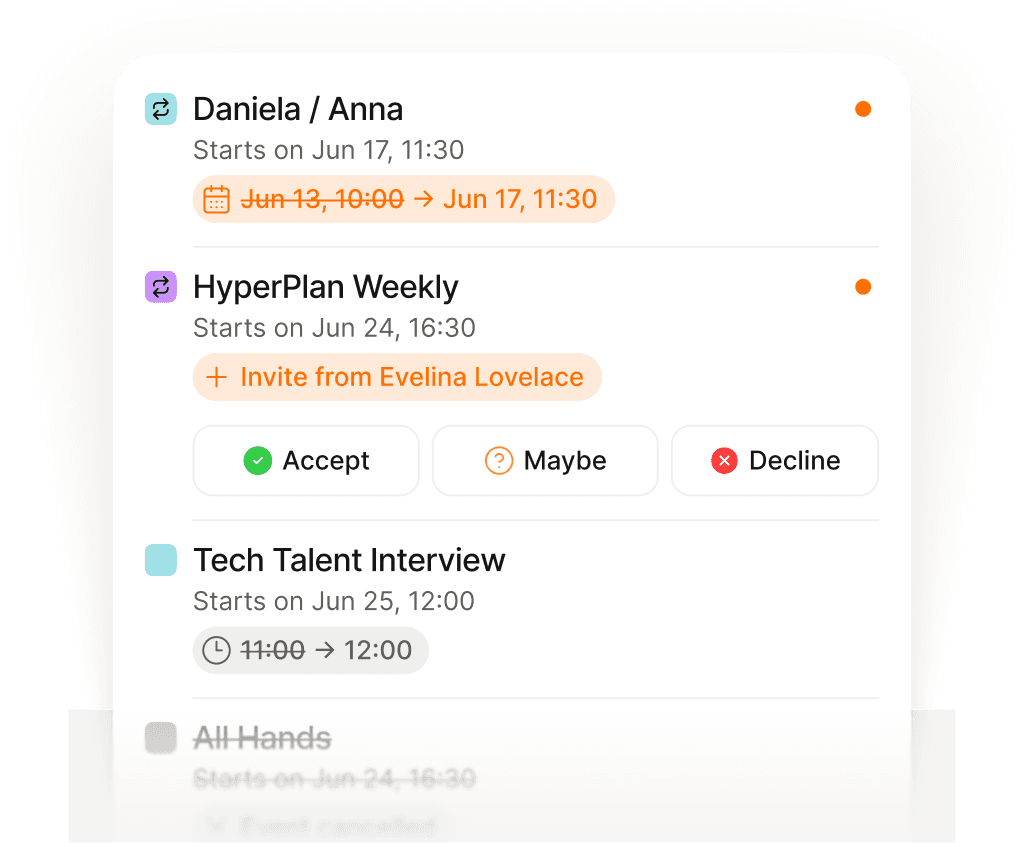
Overnight, one meeting moved, another was canceled, and a new invite needs an RSVP. The information exists, but it is mixed into email and calendar notifications.

Outcome

Supaplan turns calendar changes into a focused feed so you know what changed before the day starts.

  1. Change
    Collect the schedule movement

    Invites, cancellations, and reschedules sit together instead of hiding across notification streams.

  2. Triage
    Separate action from noise

    You can see what requires a decision, what simply changed, and what creates free time.

  3. Follow-up
    Turn changes into action

    The feed can lead into agenda review or assistant help when a change needs more calendar work.
See calendar changes in one place

Invites, cancellations, and reschedules share one feed.

Catch schedule changes early

Respond while there is still room to protect the day.

Trust what changed today

Know what moved without digging through email.

Why Supaplan

Built for the whole calendar workflow.

  • Supaplan treats calendar changes as a focused workflow, not another email stream.

  • The change feed connects naturally to agenda review and assistant follow-up.

  • It is built for people with multiple calendars and frequent schedule movement.

Attention queue

From scattered updates to one change queue.

Supaplan separates calendar changes from general inbox noise so you can decide what needs attention.

  1. 01Collect changes

    Supaplan watches the calendar updates connected to your account.

  2. 02Rank attention

    Important changes are presented as a focused feed instead of scattered notifications.

  3. 03Act or ignore

    You can decide what needs action and what is simply context for your day.

Change examples

"Review what changed before starting the workday."

"Notice a canceled meeting and reclaim the time."

"Catch a reschedule before joining the wrong call."

"Keep calendar updates separate from noisy email threads."

Decision guide

Know what changed before the day moves.

Use Smart Inbox when calendar changes are frequent enough that email notifications stop being a reliable source of truth.

Best when
  • Invites, cancellations, and reschedules get lost in email noise.
  • You need to understand what changed before acting on the day.
  • A calendar change should feed the agenda or assistant workflow.
Consider another tool
  • Your calendar rarely changes and normal notifications are enough.
  • You want a full email inbox replacement rather than a calendar change feed.

Pairs well withSmart Agenda so important changes show up in the daily plan.AI calendar assistant when a change requires follow-up scheduling work.

FAQ

Questions before using a calendar inbox

What is a calendar smart inbox?

A calendar smart inbox is a focused feed for meeting changes, invites, cancellations, and updates that would otherwise be buried across email and calendar notifications.

Does Smart Inbox replace email?

No. It gives calendar changes a clearer place to live so you do not need to scan email just to understand what happened to your schedule.

Who is Smart Inbox for?

It is useful for people with busy calendars, many invitations, frequent reschedules, or several calendar accounts.