

Digital business cards

Share one card. They reach you instantly.

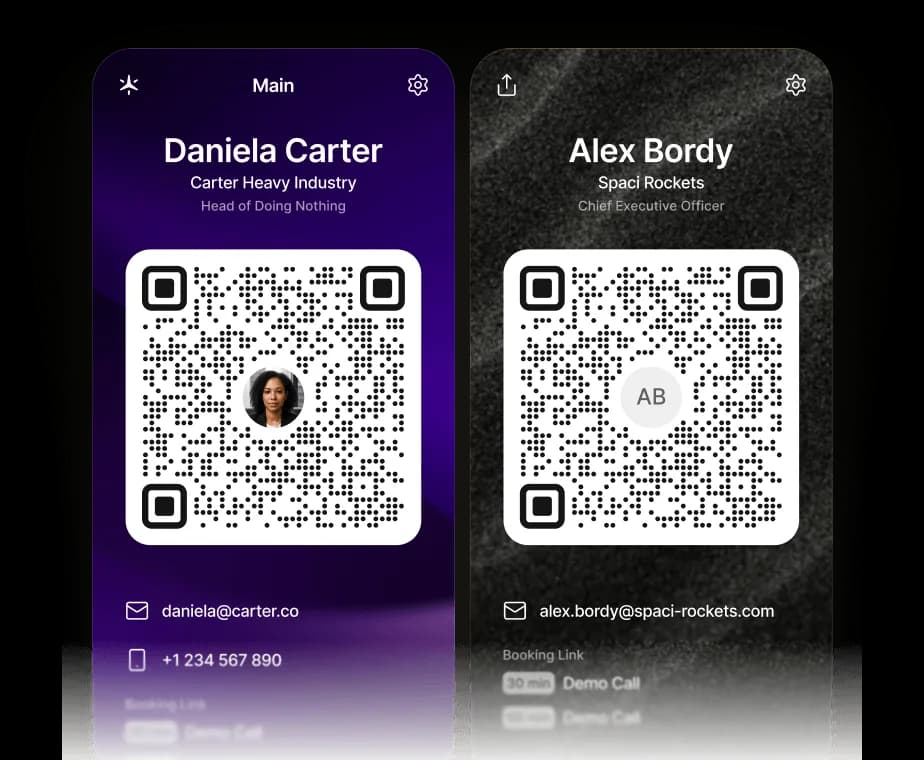
A Supaplan digital business card holds your email, phone, links, and booking link behind one QR code, so anyone can scan it, save your vCard, and book time with you in seconds.

Best forFounders, sales, and consultants who share contact details and want replies, not lost paper cards.

Download on the App Store
Get it on Google Play
In practice

A handshake becomes a saved contact and a booked call.

You meet someone at an event. The old workflow is spelling out your email, hoping they typed it right, and never hearing back because the moment passed.

Outcome

They scan your card, your vCard lands in their phone, and your booking link is one tap away while the conversation is still fresh.

  1. Show
    Open your card

    Bring up your Supaplan card with your name, role, contact details, links, and booking link on one screen.

  2. Scan
    They save your vCard

    A scan of the QR code saves your contact straight to their phone — no app, no typing, no lost paper card.

  3. Book
    They book or message you

    Your booking link is right there, so they can grab time or reach out before the conversation cools off.
One scan saves everything

Name, email, phone, and links land in their phone.

Booking built into the card

People book time with you straight from the card.

Always up to date

Change your details once and everywhere reflects it.

Why Supaplan

Built for the whole calendar workflow.

  • The QR code saves a real vCard to the other phone, not just a link to a web profile.

  • Each card carries your Supaplan booking link, so people can book time directly from the card.

  • Your card stays current — update your details once and every shared card reflects it.

Workflow

From a quick intro to a saved contact and a booked call.

Show your card, let the QR code save your vCard, and keep your booking link one tap away.

  1. 01Show the card

    Add your contact details, links, and Supaplan booking link to a card.

  2. 02Save the vCard

    Show the card or its QR code to anyone you meet, in person or on a call.

  3. 03Book the call

    They scan it to save your vCard and book time with you instantly.

Card examples

"Share my card so this contact saves my details to their phone."

"Let people book a call with me straight from my business card."

"Add my LinkedIn and website to the card I hand out at events."

"Send my digital business card after a meeting instead of a paper one."

Decision guide

Use a digital business card when paper gets lost.

Use a digital business card when you want people to save your details and book you instead of losing a paper card.

Best when
  • You want one card that shares contact details and lets people book you.
  • You meet people in person or on video and want them to save your details instantly.
  • You would rather share a QR code than dictate your email and phone number.
Consider another tool
  • You only need a static text signature with no contact-saving or booking.
  • You never share contact details and never take meetings from new people.

Pairs well withScheduling links so the booking link on your card protects real availability.Contact intelligence so the people who reach out arrive with context attached.

FAQ

Questions before sharing a digital business card

What is a digital business card?

A digital business card shares your contact details and links through one screen or QR code. Supaplan cards also carry your booking link, so people can save your vCard and book time with you instantly.

Does the QR code save my contact to their phone?

Yes. Scanning the QR code downloads a vCard with your name, email, phone, and links straight into the other person’s contacts — no app required.

Can people book a meeting from my card?

Yes. Your Supaplan booking link travels on the card, so anyone who scans it can grab time with you without a back-and-forth scheduling email.