 App
AppI schedule meetings on my commute just by talking. By the time I get to my desk, everything is already in my calendar.

Ethan Carter
Senior Vice President Services


Your AI replaces the mental overhead of scheduling, notes, and calendar chaos — so you stay on top of every context, every contact, and build stronger relationships.
Back us with your vote — 1 click that makes a huge difference for our indie team.

No credit card required · Free for 30 days, full power, no limits · Your data secured in Switzerland


Every calendar task handled for you — zero mental load.
Reschedule a call, block focus time, send an invite, cancel lunch — just tell Supaplan. Got a photo of a flyer, invite, or screenshot? Send it and Supaplan adds the event for you. It runs your calendar the way a great PA would: instantly, accurately, without you ever having to think about it.

Your whole day on one screen — clear, ordered, nothing missed.
Stop scrolling a fragmented grid trying to piece together your day. Supaplan shows every meeting, gap, and commitment in a clean timeline — so you always know what's next, how much free time you actually have, and where your energy is going. Your morning starts with clarity instead of confusion.

Walk into every meeting prepared. Walk out with clear next steps.
Before every meeting, your notes, last discussion, and agenda are right there — no hunting. During the meeting, jot down what matters. After it ends, action items are attached directly to the event, not buried in a doc you'll never find again. Every meeting leaves a clean trail.

One link, one click — meetings booked without a single email.
Share your scheduling link and let people pick a time that actually fits — no timezone confusion, no endless back-and-forth, no calendar invites bouncing around. You set your availability once, they book a slot, and both calendars update instantly. What used to take ten emails now takes ten seconds.

Stay on top of every change — updates reach you automatically.
Meetings get rescheduled, cancelled, and added all the time — often while you're already on another call. Instead of digging through your inbox to piece together what changed and when, Supaplan surfaces every update the moment it happens. You're always in the loop without ever opening your email.

Every contact remembered — name, context, and what you discussed.
Before every call, Supaplan shows you who you're meeting, the last thing you talked about, notes from past interactions, and anything still unresolved. You walk in knowing their context and what matters to them — not scrambling 30 seconds before to remember where you left off.
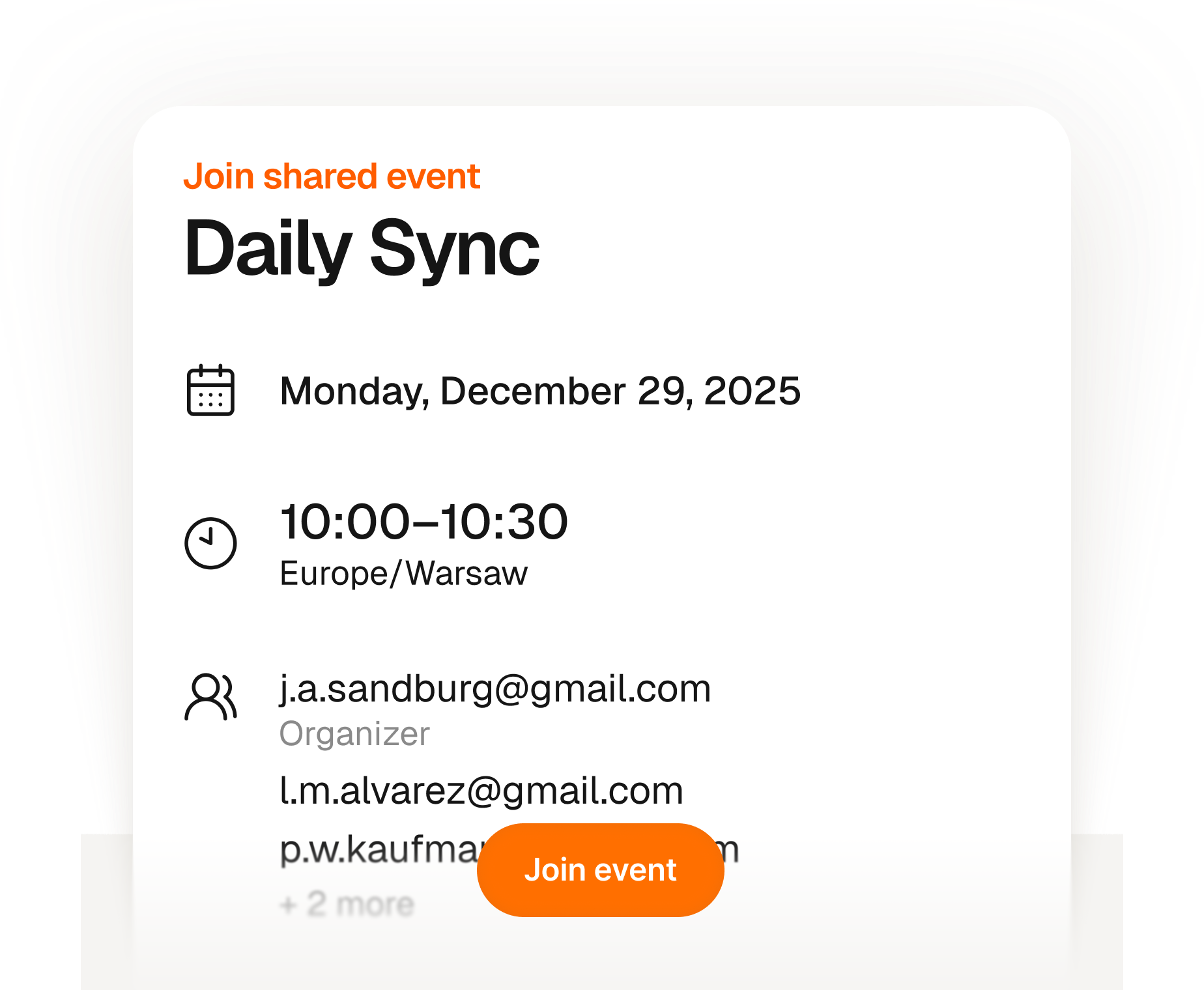
Your guests join in seconds — no account, no app, no confusion.
Create an event and share one link — anyone can RSVP with just their name and email. No account to create, no app to download, no calendar invite to wrestle with. You get a live list of who's coming, all in one place. Simple for you, completely frictionless for them.
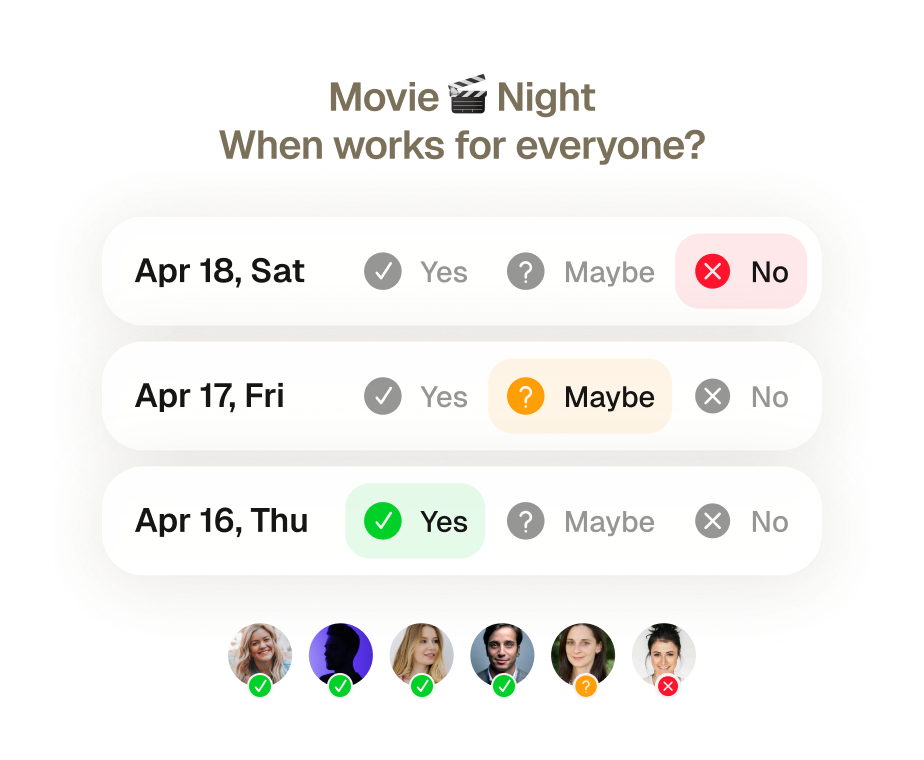
Find a time that works for everyone.
Create a group poll and let everyone vote on the dates that work for them. Supaplan collects all the responses and books the winning time — no email threads, no back-and-forth.
Every calendar task handled for you — zero mental load.
Reschedule a call, block focus time, send an invite, cancel lunch — just tell Supaplan. Got a photo of a flyer, invite, or screenshot? Send it and Supaplan adds the event for you. It runs your calendar the way a great PA would: instantly, accurately, without you ever having to think about it.
Walk into every meeting prepared. Walk out with clear next steps.
Before every meeting, your notes, last discussion, and agenda are right there — no hunting. During the meeting, jot down what matters. After it ends, action items are attached directly to the event, not buried in a doc you'll never find again. Every meeting leaves a clean trail.
Stay on top of every change — updates reach you automatically.
Meetings get rescheduled, cancelled, and added all the time — often while you're already on another call. Instead of digging through your inbox to piece together what changed and when, Supaplan surfaces every update the moment it happens. You're always in the loop without ever opening your email.
Your guests join in seconds — no account, no app, no confusion.
Create an event and share one link — anyone can RSVP with just their name and email. No account to create, no app to download, no calendar invite to wrestle with. You get a live list of who's coming, all in one place. Simple for you, completely frictionless for them.
Your whole day on one screen — clear, ordered, nothing missed.
Stop scrolling a fragmented grid trying to piece together your day. Supaplan shows every meeting, gap, and commitment in a clean timeline — so you always know what's next, how much free time you actually have, and where your energy is going. Your morning starts with clarity instead of confusion.
One link, one click — meetings booked without a single email.
Share your scheduling link and let people pick a time that actually fits — no timezone confusion, no endless back-and-forth, no calendar invites bouncing around. You set your availability once, they book a slot, and both calendars update instantly. What used to take ten emails now takes ten seconds.
Every contact remembered — name, context, and what you discussed.
Before every call, Supaplan shows you who you're meeting, the last thing you talked about, notes from past interactions, and anything still unresolved. You walk in knowing their context and what matters to them — not scrambling 30 seconds before to remember where you left off.
Find a time that works for everyone.
Create a group poll and let everyone vote on the dates that work for them. Supaplan collects all the responses and books the winning time — no email threads, no back-and-forth.
I schedule meetings on my commute just by talking. By the time I get to my desk, everything is already in my calendar.
Before every 1:1 I see what we talked about last time and what's still open. I stopped walking into meetings unprepared.

Clients book through my link, I show up knowing their history. Best sales quarter I've had.

Probably saving 3–4 hours a week just on scheduling. That adds up fast.

Switched from Calendly. Everything stays in one place now and the team actually uses it.

I attach action items straight to the meeting. Before the next standup I see exactly what we decided. No more digging through Slack.

I just type "move my 3pm to Thursday" and it's done. That used to take 10 messages back and forth.

Ditched Calendly six months ago. My calendar, notes, and contacts are all in one place. Way less tab switching.

Quick briefing before each call — name, history, what we need to cover. 30 seconds to read, saves me from winging it.

12 programs, 12 sets of stakeholders. The notes attached to each meeting are the only reason I stay on top of it all.

I schedule meetings on my commute just by talking. By the time I get to my desk, everything is already in my calendar.
Before every 1:1 I see what we talked about last time and what's still open. I stopped walking into meetings unprepared.
Clients book through my link, I show up knowing their history. Best sales quarter I've had.
Probably saving 3–4 hours a week just on scheduling. That adds up fast.
Switched from Calendly. Everything stays in one place now and the team actually uses it.
I attach action items straight to the meeting. Before the next standup I see exactly what we decided. No more digging through Slack.
I just type "move my 3pm to Thursday" and it's done. That used to take 10 messages back and forth.
Ditched Calendly six months ago. My calendar, notes, and contacts are all in one place. Way less tab switching.
Quick briefing before each call — name, history, what we need to cover. 30 seconds to read, saves me from winging it.
12 programs, 12 sets of stakeholders. The notes attached to each meeting are the only reason I stay on top of it all.
I'm on site most of the day. Being able to just say what I need instead of typing it — that alone makes it worth it.

I see the last conversation, open issues, their tone — before I even dial. Customers notice when you actually remember things.

Before interviews I pull up my notes from the phone screen. Much easier to stay present instead of trying to remember everything.

Business meetings, personal stuff, family commitments — first time everything lives in one view and I actually feel on top of it.

Five kids. I share availability for school events, set reminders, and haven't missed a single game since I started using it.

Send a link, they pick a time, it lands in my calendar with their info. The "when works for you?" thread is gone.

I added soccer practice while making dinner just by saying it out loud. My family thinks I'm incredibly organized now.

Finally a calendar that doesn't feel like a spreadsheet. Having notes right there in the meeting view is a bigger deal than it sounds.

Family calendars, client meetings, personal stuff — all in one view. I used to run three apps for this.

Cut Calendly. Scheduling emails dropped noticeably in the first month. Simple math.

I'm on site most of the day. Being able to just say what I need instead of typing it — that alone makes it worth it.
I see the last conversation, open issues, their tone — before I even dial. Customers notice when you actually remember things.
Before interviews I pull up my notes from the phone screen. Much easier to stay present instead of trying to remember everything.
Business meetings, personal stuff, family commitments — first time everything lives in one view and I actually feel on top of it.
Five kids. I share availability for school events, set reminders, and haven't missed a single game since I started using it.
Send a link, they pick a time, it lands in my calendar with their info. The "when works for you?" thread is gone.
I added soccer practice while making dinner just by saying it out loud. My family thinks I'm incredibly organized now.
Finally a calendar that doesn't feel like a spreadsheet. Having notes right there in the meeting view is a bigger deal than it sounds.
Family calendars, client meetings, personal stuff — all in one view. I used to run three apps for this.
Cut Calendly. Scheduling emails dropped noticeably in the first month. Simple math.
 Unlimited accountsFull calendar managementSmart agendaReal-time notificationsContact syncUnlimited presets1 scheduling link
 Everything from Starter planPersonal AI assistantPrivate notesUnlimited scheduling linksPremium supportEverything from Pro planShared context across teamsAssistant integrationsAdmin controlsUnlimited accountsFull calendar managementSmart agendaReal-time notificationsContact syncUnlimited presets1 scheduling linkEverything from Starter planPersonal AI assistantPrivate notesUnlimited scheduling linksPremium supportEverything from Pro planShared context across teamsAssistant integrationsAdmin controls